


How Meeting Notes Automation Saves Sales Time
Meeting notes automation helps sales teams save time, speed follow-ups, improve CRM updates, and turn every call into clear next steps.
Sales teams do not lose time only in meetings. They lose it in the 15 to 30 minutes after each meeting, when memory is still fresh, details are scattered across tabs, and the pressure to send a strong follow-up kicks in.
That is why meeting notes automation has become so valuable. It does more than transcribe a call. Done well, it captures the conversation, turns it into useful notes, pulls out next steps, updates the CRM, drafts the follow-up, and gives the rep time back for actual selling.
HubSpot's 2024 sales research found that reps spend only about two hours per day actively selling, while roughly one hour goes to administrative work. Other studies put non-selling time even higher. When that much of the week is tied up in internal work, even small reductions in post-call admin can create a meaningful gain in pipeline activity, responsiveness, and deal momentum.
Why sales teams lose so much time after meetings
Most sales leaders know the pattern. A rep finishes a discovery call, then has to reconstruct the conversation from partial notes, update the opportunity record, summarize key pains, draft an email, create tasks, and often brief a manager or account team.
None of that work is optional. It matters. The problem is that it is repetitive, easy to delay, and often done twice in different systems.
Manual note-taking also creates a hidden cost during the meeting itself. Reps who are busy typing every detail are not fully focused on listening, probing, and steering the conversation. The meeting feels less natural, and the rep still ends up doing cleanup work later.
A strong automation layer removes friction in both places: during the call and after it.
What meeting notes automation actually handles
The best systems do not stop at transcription. They turn an unstructured conversation into structured sales output.
That shift is where the time savings really show up.
After a paragraph like that, it helps to break the workflow into the pieces that matter most:
- Real-time transcription
- Call summaries
- Action items
- CRM updates
- Follow-up drafting
- Searchable archives
When these parts work together, the rep is no longer starting from a blank page after every meeting. Instead, the call becomes a ready-to-review package.
Meeting notes automation features that save the most sales time
Real-time transcription is the foundation. It creates a full record of the conversation, which means the rep does not need to rely on rushed notes or memory. That alone reduces mental load.
Automatic summaries save another layer of effort. Instead of replaying a recording or reading a long transcript, the rep gets the core issues, goals, objections, commitments, and next steps in a condensed format.
Action extraction is where speed turns into execution. A good system identifies what needs to happen next, who owns it, and what the buyer expects. That prevents the classic sales problem where everyone agrees on the next step in the meeting, then nobody records it clearly afterward.
CRM sync may be the most practical time saver of all. If the call summary, notes, and next steps automatically land in HubSpot or the team's system of record, reps avoid duplicate entry and managers get cleaner pipeline visibility.
Follow-up drafting closes the loop. Instead of spending 20 minutes writing from scratch, the rep reviews a draft based on the actual call and sends it quickly while the conversation is still fresh.
The difference between a transcript tool and a sales workflow
This distinction matters.
"A transcript by itself is helpful, but it does not remove much work unless someone still has to read it, summarize it, update the CRM, and write the follow-up manually."
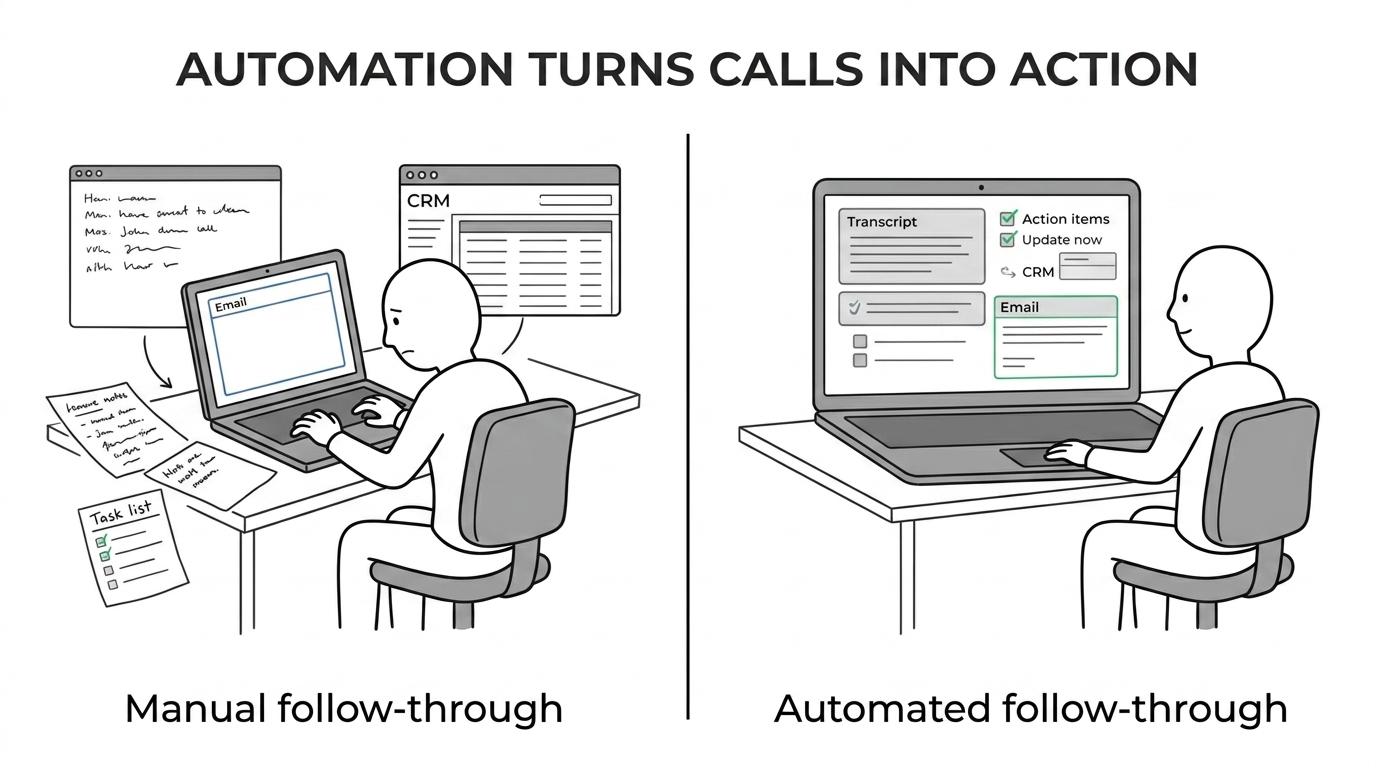
An automation-first setup handles the entire post-call sequence. That is the approach many sales and marketing teams now prefer, especially teams that already work across HubSpot, Slack, Notion, Airtable, Google Workspace, or custom internal tools.
At Augmentica Labs, that is the focus: turning a meeting into action across the systems a team already uses, rather than dropping another disconnected app into the stack.
Here is where the biggest difference usually appears:
| Manual post-call workflow | Automated post-call workflow |
|---|---|
| Rep writes notes during the call | Conversation is transcribed automatically |
| Rep rebuilds the summary afterward | Key points are summarized automatically |
| Rep updates CRM manually | Notes and fields sync to CRM |
| Rep drafts follow-up from memory | Follow-up draft is prepared for review |
| Tasks live in scattered places | Actions are pushed into the right tools |
| Context stays with one person | Team can search and reuse meeting context |
That is how a note-taking task becomes a sales acceleration system.
How much time can meeting notes automation realistically save?
The answer depends on meeting volume and how deeply the workflow is automated.
A common benchmark from sales tooling examples is about 15 minutes of manual note work per call. Comparable workflow case studies have shown about 20 minutes saved per meeting when transcript-to-action steps are automated. For a rep with four to six meetings in a day, that quickly adds up to one or two reclaimed hours.
That reclaimed time matters because it tends to sit right in the middle of the workday. It is time that can go back into prospecting, account research, follow-ups, proposals, or live conversations.
Research from Gong, HubSpot, and other sales platforms supports the broader pattern:
- Selling time: Roughly 2 hours per day for many reps
- Admin work: Around 1 hour per day in HubSpot's data
- Non-customer work: 56% or more in some reports
- Post-meeting savings: About 15 to 20 minutes per meeting in common benchmarks
When teams automate more than notes, the impact gets larger. Public examples from Augmentica Labs describe post-call workflows that analyze transcripts, draft proposals, update CRM and Notion, and queue follow-up emails for rep review. The company's broader claim of 10+ hours reclaimed per person per week fits the pattern seen in adjacent workflow automation cases.
Faster follow-up is where the revenue impact starts
Saving time is important, but speed after the meeting is even more valuable.
Sales teams know that follow-up quality drops when reps are busy. Emails go out late, details get missed, and next steps become vague. That is where note automation creates an advantage beyond efficiency.
Gong has reported that faster follow-up is associated with higher win rates and shorter sales cycles. A response within 24 hours, and even within 48 hours, can materially improve outcomes. The reason is simple: the buyer still remembers the conversation, internal urgency is still high, and momentum has not faded.
A rep who receives a call summary, extracted action items, and a drafted email can move while the deal still feels active.
That speed compounds across the pipeline.
Better notes also improve CRM quality and team coordination
Sales leaders often talk about poor CRM hygiene as if it were a discipline problem. Usually, it is a workflow problem.
If updating the CRM takes extra effort after every call, reps will delay it. Some fields stay blank. Key details remain in private notebooks. Managers lose visibility. Customer success and delivery teams start handoffs with incomplete context.
Meeting notes automation changes that by reducing the cost of documentation.
When notes flow directly into CRM and internal workspaces, teams gain:
- Cleaner records: less missing deal context
- Shared visibility: managers, AEs, SDRs, and account teams work from the same source
- Fewer dropped next steps: actions are captured while the meeting is still fresh
- Faster handoffs
- Better onboarding for new reps
This is especially valuable for agencies and B2B SaaS teams, where a single conversation often needs to inform sales, strategy, onboarding, and client delivery.
Why integration matters more than another standalone app
Many companies already have a meeting recorder. What they lack is a connected workflow.
If the summary lives in one tool, the action items live in another, and the CRM update still depends on the rep remembering to do it later, most of the value gets lost.
That is why integration-first automation has become the smarter model. Instead of forcing reps into a new system, the automation plugs into the stack they already use and quietly handles repetitive steps in the background.
For teams working with Augmentica Labs, this is often the difference between a tool that looks good in demos and a workflow that actually changes the day-to-day. The value comes from connecting transcripts, summaries, follow-ups, CRM fields, knowledge bases, and internal alerts into one operating sequence.
The result is simple: less copying, less context switching, and fewer loose ends.
What good rollout looks like for sales teams
The strongest implementations usually start small. Not because the opportunity is small, but because trust matters.
A sales team does not need to automate every call type on day one. It is better to begin with the most repetitive, high-friction meeting category, often discovery calls or demo follow-ups.
A practical rollout tends to include a few clear rules:
- Start narrow: one meeting type, one workflow, one owner
- Keep review in place: reps approve customer-facing output before it goes out
- Map the outputs: decide what goes to CRM, what goes to Slack, what goes to Notion
- Measure the change: time-to-follow-up, CRM completion rate, hours saved
Training matters too. Reps should know what the automation handles well, what still needs human judgment, and what a good output looks like. That keeps quality high without turning the system into more overhead.
One more point is worth saying plainly: the goal is not to automate the relationship. The goal is to automate the admin around the relationship.
Where meeting notes automation has the biggest payoff
Not every team gets the same return, but the strongest payoff usually appears in high-volume, fast-moving sales environments.
Agencies benefit because account leads and strategists spend too much time translating conversations into internal work. B2B SaaS teams benefit because discovery details, objections, stakeholder names, and implementation requirements often need to move quickly from sales to the rest of the business.
The pattern is clear across both:
- More meetings per rep
- More systems to update
- More internal coordination
- More value from faster follow-up
That is why the most effective note automation is not really about notes. It is about compressing the distance between what happened in the meeting and what happens next.
For sales teams trying to reclaim hours without adding headcount, that is where the real gain lives.

Related Posts
AI Automation Services for Marketing Teams
Custom AI Development for Sales Workflows

AI Integration Services for Existing Stacks
Ready to Automate Your Sales and Marketing?
We build AI agents and automations that cut manual work so your team can focus on scaling.